
Fresh Paths Worth Following
Untethered Performance - Outbound GOAT Five9 Mobile App
- Details
- Written by: Martin Ortiz
- Category: Summit
- Hits: 154
How Outbound GOAT Takes Five9 to the Summit and Beyond with Mobile App
A contact center architecture is only as strong as its weakest endpoint. For organizations with field sales agents, technical engineers, or mobile adjusters, that endpoint has always been the cliff edge where the technology stack runs out of trail. Step away from the desk, and an agent loses the dialing logic, the compliance guardrails, and the deep CRM integrations that make them effective. They are left to scale the mountain alone.
Outbound GOAT doesn’t just reach the summit. We carry the whole base camp up with us.
Our mobile application natively extends the enterprise cloud contact center platform into the field. Wherever the herd roams, rooftop, job site, parking lot, or mountain pass, your mobile workforce retains every capability they rely on back at base camp, right from their mobile devices.

From base camp to the summit: the Outbound GOAT Mobile Framework carries the full Five9 agent desktop up every trail.
No Mountain Too Steep: True Field Architecture
Many mobile solutions rely on simple call forwarding or standalone dialers that fracture your operational data with workarounds that leave teams stranded halfway up the trail. We don’t believe in fragmented patches. If a system change doesn’t reinforce the entire technical framework, it doesn’t make the climb.
This app mirrors the exact native workstation setup, checkpoint for checkpoint. Field agents remain fully synchronized within the existing ecosystem, climbing with the same precision and confidence as an in-office agent standing at base camp.
Sure-Footed Capabilities, Wherever the Trail Leads
The application doesn’t ask users to learn new switchbacks or compromise on functionality. It carries the full strength of the tech stack straight up the mountain and onto the mobile interface.
• Identical System Connectivity — Agents place and receive calls exactly as if they’re sitting at their desks without any detours, or dropped trail markers. The platform handles call routing, logging, and data flow with absolute consistency.
• Intelligent Dialing Logic — Mobile teams leverage advanced automated dialing modes out in the field, covering more ground and maximizing talk time without manual data entry. This product is built for agents who move fast and don’t look down.
• Unified Reporting and Compliance — Every interaction is tracked, recorded, and evaluated under your established administrative settings. Supervisors retain a clear view from base camp to summit, preserving QA standards regardless of where the herd has wandered.
Base Camp to Summit: Zero-Friction Deployment
Implementation requires no extensive overhaul of your current workflows. Because the software uses prebuilt connectors and open APIs, deployment happens smoothly within your active infrastructure. No new gear, no base camp to break down and rebuild.
Your organization has already invested heavily in building a high-performing contact center architecture. That investment shouldn’t stop at the office door, or the trailhead. By giving field teams the exact same structural tools as your internal department, you drive higher conversions, absolute data integrity, and total operational control.
That’s the Outbound GOAT difference: Greatest Of All Trails. Contact our GOAT team to learn more and to schedule a demo.
The Biggest Pitfalls in Outbound Dialing Campaigns and How to Avoid Them
- Details
- Written by: Martin Ortiz
- Category: Summit
- Hits: 148
In outbound sales, everyone wants to be the GOAT. Unfortunately, many dialing campaigns end up looking more like a goat running loose in a backyard. They create noise, waste resources, frustrate customers, and generate very little return.
Outbound dialing can still be one of the most effective ways to generate leads and drive revenue, but success requires much more than simply increasing call volume. Poor targeting, weak compliance practices, and outdated dialing strategies can quickly lead to spam flagging, low conversion rates, customer frustration, and exhausted agents. That is not exactly GOAT level performance.
One of the biggest mistakes businesses make is relying on poor quality data and weak targeting. Calling outdated or poorly segmented lists almost always results in low engagement because prospects immediately recognize irrelevant outreach. Nobody wants to feel like they were randomly selected from the herd. The strongest outbound programs begin with a clearly defined Ideal Customer Profile, or ICP, and focus on reaching people who are genuinely likely to benefit from the solution being offered. The more relevant the outreach, the stronger the conversation becomes.

Another major pitfall is neglecting compliance requirements, especially Do Not Call regulations and TCPA standards. Ignoring compliance can result in fines, lawsuits, carrier blocking, and serious damage to brand reputation. One poorly managed campaign can quickly turn a company from Greatest Of All Time into Ghosted On Arrival Tactics. Modern outbound operations should automate important compliance functions such as:
- DNC list scrubbing
- Consent tracking
- Calling hour restrictions
- Opt out management
Generic messaging is another common problem. Prospects can identify a recycled sales script almost immediately, and when outreach feels robotic or impersonal, engagement drops quickly. The best outbound teams do far more than simply dial and smile. They personalize conversations based on industry, customer pain points, prior interactions, and role specific challenges. Great outbound communication is not about sounding like a machine. It is about sounding human.
Timing and call frequency are equally important. Calling too early, too late, or repeatedly within short periods can irritate prospects and increase spam complaints. Overcalling leads, often called double dialing, is one of the fastest ways to damage phone number reputation. Even the GOAT knows when to stop headbutting the same fence. Strong outbound programs use intelligent call cadence strategies that balance persistence with customer experience.
Technology configuration is another area where many businesses struggle. Manual dialing wastes agent time, while poorly configured predictive dialers can create abandoned calls and awkward periods of silence that frustrate prospects. The right technology should help conversations flow naturally, not leave customers wondering if they accidentally answered a robocall from a pasture somewhere. Businesses should ensure their dialing environment supports:
- Intelligent pacing
- Reputation monitoring
- Local presence management
- Real time analytics
Finally, many organizations fail to measure outbound performance consistently. Without tracking metrics such as conversion rate, contact rate, abandonment rate, and cost per acquisition, teams are essentially climbing a mountain without knowing where the trail leads. The best outbound teams continuously monitor performance, optimize campaigns, and adjust strategies before small problems become major issues.
At the end of the day, outbound success is no longer about brute force dialing. The companies that truly earn GOAT status are the ones that prioritize relevance, compliance, personalization, and customer experience. Smarter targeting, better technology, and thoughtful outreach do more than improve conversion rates. They protect brand reputation and create stronger long term customer relationships.
Because in modern outbound sales, the GOATs do not simply make more calls. They make the right ones.
Ready to stop wasting time on outbound strategies that do not deliver results? Whether your team needs better targeting, smarter dialing practices, stronger compliance management, or technology that improves performance, Outbound GOAT can help you reach the next level. Visit Outbound GOAT and click the “Ready to Climb” link to connect with our team and start building an outbound program that truly earns GOAT status.
Silence and Dead Air: Outbound's "Silent" Struggle
- Details
- Written by: Jess Clay
- Category: Summit
- Hits: 212
I am "The Queen of Dead Air" for a reason. It's not the most glorious title, but you name it, I've seen it. I've troubleshot some of the most complex dead air issues over my time, and my pain is your gain.
 "Dead Air" can be a really painful problem for VOIP contact center businesses and their customers, especially if the source of the challenge cannot be quickly identified. Where to look is a fundamental question that many businesses struggle to get an answer to.
Let's start by defining "dead air." Dead air is the absence of 2-way audio in a connected call. This differs from call quality or audio degradation, though the causes are often the same.
The good news is that 99.999% of the time, the cause is environmental or agent behavioral. This news is good because the resolution is within your control.
So, what are the most common causes of dead air? Here's a list of things to investigate in order of the most common causes.
1. Wi-Fi
Wi-Fi usage is a prevalent cause of dead air. Any software that has a streaming component requires a stable internet connection, and voice is no different in that regard. The difference between streaming video and audio is that video will often buffer and re-establish the connection. In contrast, streaming audio causes packet loss and can result in a disconnected session. Once the session is disconnected, it is often lost entirely. Some small contact centers can use Wi-Fi without issue, but that is playing with fire since there is a tipping point that you cannot see or measure. Router bandwidth, the proximity of the workstation to the router, and the host of other applications running on machines that consume that bandwidth are just a few variables that can affect the stability of the Wi-Fi signal. This is particularly dangerous for work-from-home agents because everything is Wi-Fi enabled, from your smart fridge to your thermostat to your TVs and your kids streaming from 3 different devices simultaneously.
If your agents are on Wi-Fi, have them plug through an ethernet cable and see if the issue goes away.
2. Machine Resources
If there could be two number 1 causes, this would be the other. Much like Wi-Fi, under-resourced machines can have severe detrimental effects on 2-way audio. Oftentimes, customers look at the "minimum" resources to facilitate the software, not considering that the minimum is to run this particular application. You should have the "recommended" amount of bandwidth at a minimum. When you think about everything required to run your business, on top of the things the agents run because they can, you find that machine resources dwindle very quickly. I can't begin to count the number of times I've been troubleshooting dead air live with an agent only to see 400 open tabs, YouTube streaming, email, the CRM, security scans, and the like running as well.
Have your agents open Task Manager. You want to see no more than 40% -50% of CPU and memory being used at any given time. Yes, consuming all of the disk space also will cause issues. The higher the utilization of each machine resource, the more likely they will experience call quality degradation. Once you hit 70% -80% or higher, they are likely to be experiencing dead air and session disconnects. Remember, minimum spending on machines can result in minimum profits for your business.
3. Browser Settings
Here's a fun story. Browser developers don't think about all the applications running over their browsers. With every new release, they add experimental flags and settings that can severely affect VOIP applications. Some very common ones that cause issues are sleeping tabs intended to conserve memory, energy saver settings, cookie settings, 3rd party storage partitioning, and auto-refresh extensions. VOIP companies do their best to test new browser releases, but it's worth noting that no two contact centers are the same, and the pace of releases, including hotfixes, can be very rapid. In addition, your CRM or other applications may suggest specific settings that introduce issues with your VOIP software. That is something to keep in mind as well.
Take a look at the various browser settings and experimental flags and adjust the suspicious ones until you find the source of the issue. You can also ask the VOIP providers' Support Team if they have a list of problematic settings. Moreover, you want to stay 1-2 release versions behind. The problem with being on the "bleeding edge" of new releases is that you, well…bleed.
4. Bluetooth Headsets
Having agents near each other using Bluetooth is a not-so-fun exercise in "Who's on first," especially if they are all the same make and model. Bluetooth headsets are rife with opportunities for interference, not to mention the range and battery life challenges. Oh, and as the battery life diminishes, so does the range. Don't even get me started on AirPods. The worst part is that AirPods often work great…until they don't…and then we're wasting time troubleshooting AirPods that will inevitably experience this same issue again. AirPods, beats, and other music-oriented headset devices = bad.
Always check with your VOIP provider for a list of recommended headsets. Generally speaking, most wired headsets are compatible, but the recommended ones have been tested with the software. If you want to vet this out as a potential contributing factor, plug your agents up with a wired headset, and if you're going to prevent issues, do this out of the gate.
5. Internet Speeds and Bandwidth
Businesses and work-from-home agents must consider the size of their internet pipe. Like Wi-Fi, many little-thought-of devices consume bandwidth, and the more active devices, the more bandwidth consumed. As your employee base grows, so does bandwidth consumption in an office setting. Moreover, suppose you don't have a dedicated pipe. In that case, you may be sharing the internet with other businesses in your building, significantly reducing your visibility and control over ensuring your business has adequate bandwidth to support your team. In a home environment, especially if agents aren't guided on minimum speeds, they will often have a package that is insufficient to handle VOIP traffic and all household devices. WFH agents especially should be hard-wired in.
Try speedtest.net from your machines during peak traffic hours to see what speeds you are getting. VOIP providers also typically offer connectivity tests and assessments that measure your connections' speed, MOS scores, jitter, and packet loss. These can offer insights into how internet speeds may be impacting your business.
6. Group Policy and Virtual Machines
I'm lumping these together because they both have the same challenges. Suppose you lock down some aspects of the machines. In that case, the software may be unable to update required extensions, receive new bug fixes, or capture software enhancements necessary to maintain quality and performance. In addition, you may have specific things locked down from upgrading (such as a softphone extension) whilst the application's code base is updated outside of your control, rendering these two elements incompatible. It's VERY important that your technical resources stay on top of testing and software deployments in a group policy or virtual machine setting.
You don't have to be on the "bleeding edge". As I mentioned earlier, that can introduce its challenges. However, timely non-production testing and feedback to your VOIP provider can help them identify challenges in new releases and correct them before the code hits production.
7. OS Settings
Yep. Another group of settings that might ruin your happiness. OS settings for your agents can wreak havoc on your agent population. This is especially true if you have other UCaaS or CCaaS solutions in the mix. The most common symptom tied to this is when you hear agents say, "The first call is always dead air after I log back into the application." This indicates that you have an application that maintains control of the headset when switching between them. If you're not hearing that callout, this is still worth checking.
Check your machines' sound settings to see if "exclusive mode" is enabled. It is also worth exploring other settings, such as the system's default device and whether the headset's current drivers are up to date.
8. Security Software
Le sigh. Security software always thinks it knows best, which can cause scans of your VOIP application to throw flags and subsequently "protect" you from the application.
Always review your security scans and settings to ensure your VOIP application isn't being blocked for security reasons. If it is, ask your VOIP provider to provide a letter from their InfoSec Team explaining why the identified risk does not expose your business to harm.
9. IP Whitelisting
If you whitelist the IPs that can communicate with your systems, this would be a great check. VOIP providers do expand their IP ranges, and if the new ones aren't whitelisted on your network, you may run into issues. Don't forget to check this on your VPN if you have one!
10. Carrier Issues
Carriers are not perfect! They do have outages, equipment failures, and challenges that surface from time to time. Most VOIP providers have multiple carriers to ensure redundancy, allowing them to route call traffic around carriers experiencing technical challenges if needed. To diagnose this, you'll have to work with your VOIP provider. They will ask for samples from the last 24 hours to perform their research and may ask for samples a few times. This is because carrier-side logs usually expire within 24 hours, and more than one carrier may be impacted. It's also not uncommon for the VOIP provider to ask to do RTP captures to help diagnose the issue's source.
If it's not any of the above, there are other causes. Firewall Settings, MPLS Circuits, SIP Trunks, Zscaler and other security software, NAT translation, agents located in a country without reliable internet, network equipment failures and frayed cables, and distance from the data centers can all contribute to call quality and/or dead air issues. Let us not forget that the VOIP providers are not impervious to issues, though that's much less common. Always open a support case with your provider to get things moving while investigating these other common causes.
Note that dead air issues can be a combo of things as well. While it certainly could be a single thing, don't assume there's one magic bullet for resolving this every time. In my time, I've seen combinations of bad browser settings, too little RAM and agents on Wi-Fi, and many other combinations.
Make sure to read your VOIP Provider's technical requirements documents. Support Teams will struggle to find the cause and may even refuse to troubleshoot if you are not complying with the technical requirements for operating the software.
A Winning Strategy for Operational Efficiency
- Details
- Written by: Martin Ortiz
- Category: Summit
- Hits: 165
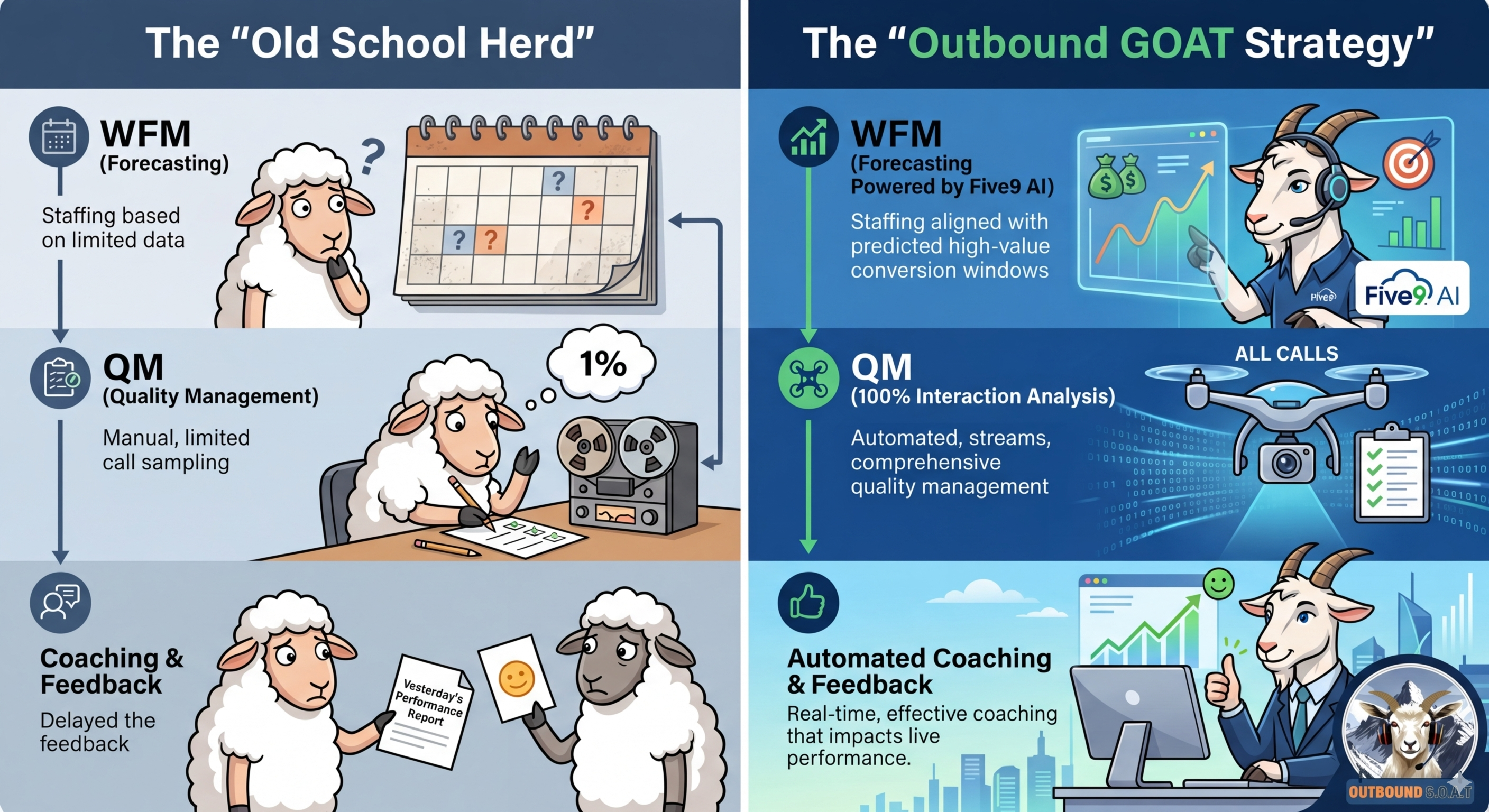
In the high stakes world of outbound sales, treating Workforce Management and Quality Management like boring back office chores is a recipe for disaster. Most contact centers are still playing an old school game where they forecast the volume and schedule the agents. They listen to a tiny handful of calls and then they just repeat the cycle. At Outbound GOAT, we know that being the Greatest of All Time requires a totally different playbook. These functions are the strategic horns that drive your revenue and customer experience.
 Closing the Gap in the Pasture
The biggest problem we see is the Hidden Gap. This happens when your teams are grazing in completely different pastures. Most organizations have one team looking at historical staffing patterns while the other team evaluates calls from three weeks ago. This creates a lagging system that measures performance instead of shaping it. In an outbound environment, this gap is a total mistake. Every misaligned call is a missed conversion. You end up overstaffed during low value interactions and understaffed when the high value windows are wide open.
Leading the Herd with Five9
That is where the power of the Five9 platform changes the game. Outbound GOAT does not just implement software because we prefer to lead the herd. Five9 acts as the unification layer to bring these tools into a single high-speed loop. Forecasting is no longer just about how many heads are in seats. With AI powered insights, we are looking at call outcomes and conversion rates. We shift the focus to how many winning conversations we can create today.
Scaling Quality to 100%
Scaling quality is the next frontier for every leader. Let us be real about the facts. Manual reviews that only look at a tiny fraction of calls are just lucky guessing. Through the AI tools in Five9, we enable a full evaluation of every interaction. Every single call is checked for compliance and effectiveness. This creates a closed loop strategy where quality insights feed directly into coaching. This improves agent behavior and then sharpens your next forecast. It is a continuous cycle of improvement that turns raw data into a revenue generating machine.
Orchestrating the Win
At Outbound GOAT, we know that outbound programs cannot hide inefficiencies. Every dial has a cost and every conversation has a purpose. We make sure your top performers are scheduled exactly when connect rates are peaking. We do not just watch the clock. We orchestrate the entire operation so that staffing and conversions are perfectly aligned.
The future is about building a smarter revenue engine that learns in real time. With the right strategy and the Five9 platform, your programs stop being a basic function. They become your ultimate competitive advantage.
You should stop following the herd and start leading it with us.
Don't Follow the Herd: Why Hiring a Full-Time CX Technologist Costs More Than You Think
- Details
- Written by: Martin Ortiz
- Category: GOAT Intelligence
- Hits: 138
When companies invest in contact center technology, the instinct is almost always the same: hire someone. A dedicated technical specialist feels like the responsible move, someone accountable, available, and fully yours. But that instinct carries a price tag that most budget analyses never fully surface.
Over five years, a single experienced CX technologist at a $120,000 base salary costs your organization over $1.1 million. A scoped consulting engagement delivering equivalent output costs roughly $720,000. That $400,000 gap is not an anomaly. It is the predictable result of costs that rarely make it into the hiring conversation.
The four layers most budgets miss
The base salary is just the starting point. Employer-paid benefits including healthcare, retirement contributions, and payroll taxes add another 30% annually, roughly $36,000 to $40,000 on a $120K base. Recruitment for a specialized CX role routinely runs $12,000 or more when agency fees enter the picture. Onboarding and ramp time add another $15,000 in lost productivity before your new hire is operating at full capacity. Ongoing training to keep pace with platforms like Salesforce, Genesys, or Five9 runs $4,000 to $8,000 per year, and it is not optional in a space that evolves as fast as CX technology does.
Then there is turnover.
The cost multiplier nobody wants to model
Gallup research puts the cost of replacing a technical professional at approximately 80% of their annual salary. For a $120,000 CX technologist, one voluntary departure triggers a roughly $96,000 replacement event covering recruiting, lost institutional knowledge, and the overtime absorbed by the team left behind. At a conservative 25% annual attrition probability for this talent segment, that risk carries an expected annual cost of $24,000, compounding across every year of the employment relationship.
Gallup also found that 52% of voluntarily exiting employees said their organization could have done something to prevent their departure. This is not a passive risk. It is an active operational one.
What consulting actually costs and delivers
A specialized CX consulting engagement at $100 to $150 per hour, scoped to roughly 900 to 1,040 billable hours per year, runs approximately $133,000 in year one. There are no benefits obligations, no recruiting costs, no training investments, and no turnover exposure. Light project management oversight adds about $3,000 annually. That is it.
Beyond the numbers, a seasoned CX consultant arrives certified and deployable from day one. Engagement scope flexes with actual demand, intensive during implementations and lighter during steady state, eliminating the structural waste of carrying a salaried employee through low-demand periods. When continuity is needed, the responsibility for staffing and knowledge transfer sits with the consulting firm, not with you.
When a permanent hire makes sense
This is not an argument against hiring. If your organization requires more than 1,800 hours per year of dedicated CX technical support on a continuous basis, is building proprietary platform infrastructure, or has compliance requirements that restrict external access, a permanent hire may be the right call. Even then, pairing a consulting resource with a junior internal hire often produces better economics than recruiting senior talent directly.
The real question
The higher hourly rate of consulting does not translate into higher total cost. When every layer of employment expense is properly loaded into the analysis, the math is consistent: specialized CX consulting costs roughly $400,000 less over five years than the equivalent permanent hire.
For CX leaders and finance executives evaluating how to resource their technology capabilities, the question is not whether consulting is more expensive. It is whether your organization can afford the hidden costs of getting the hiring model wrong.
OutboundGOAT specializes in contact center technology consulting — Salesforce Service Cloud, CCaaS implementation, CX operations, and workforce management. Engagements are scoped, performance-oriented, and designed to deliver senior-level output at mid-market cost. Reach us at https://www.outboundgoat.com/index.php#contact.
Full Whitepaper at: https://www.outboundgoat.com/WhitePapers/OBG-ConsultingOrHire-whitepaper.pdf